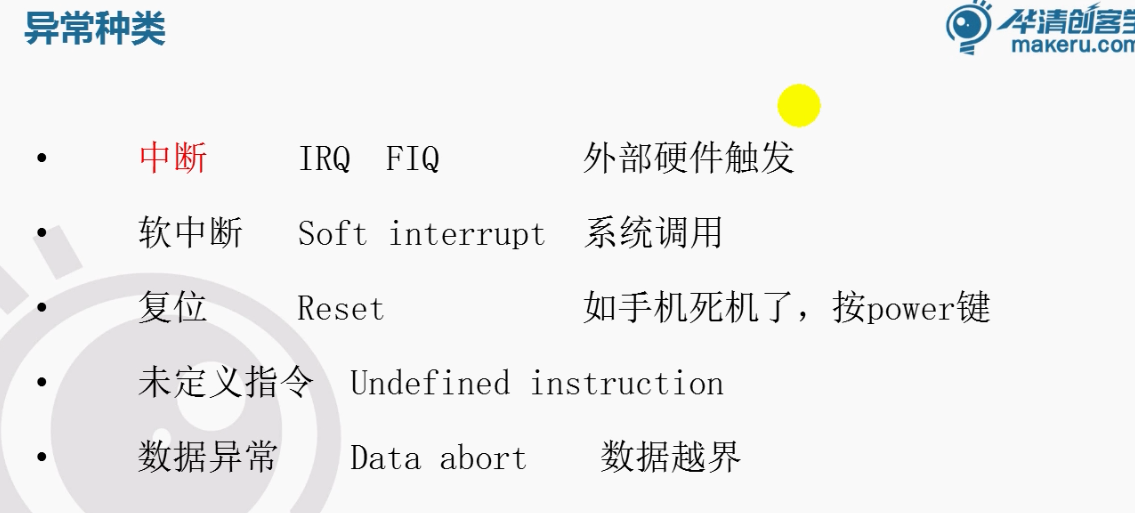
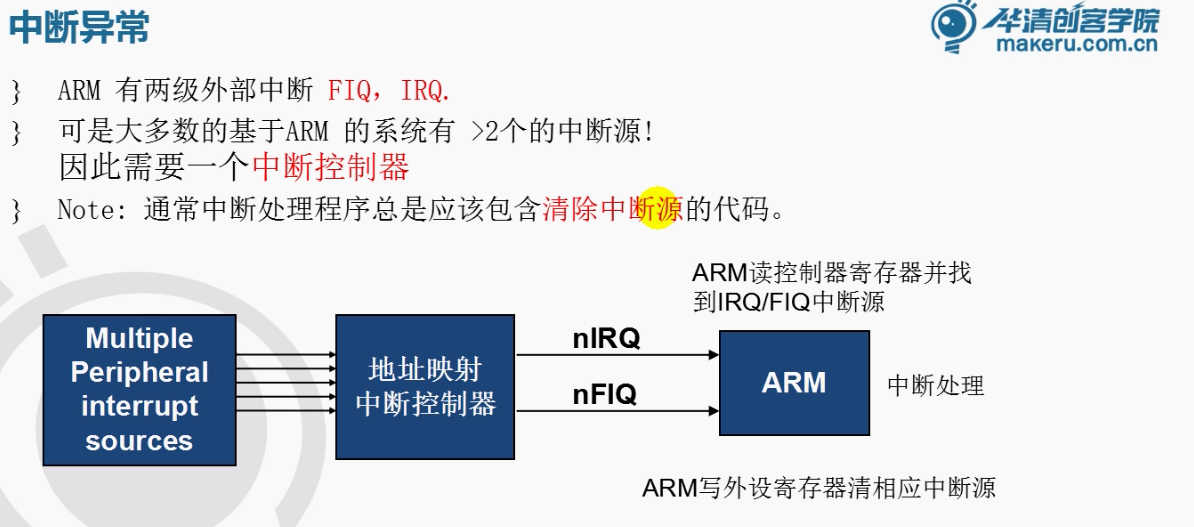
Arm 异常处理 - 中断异常
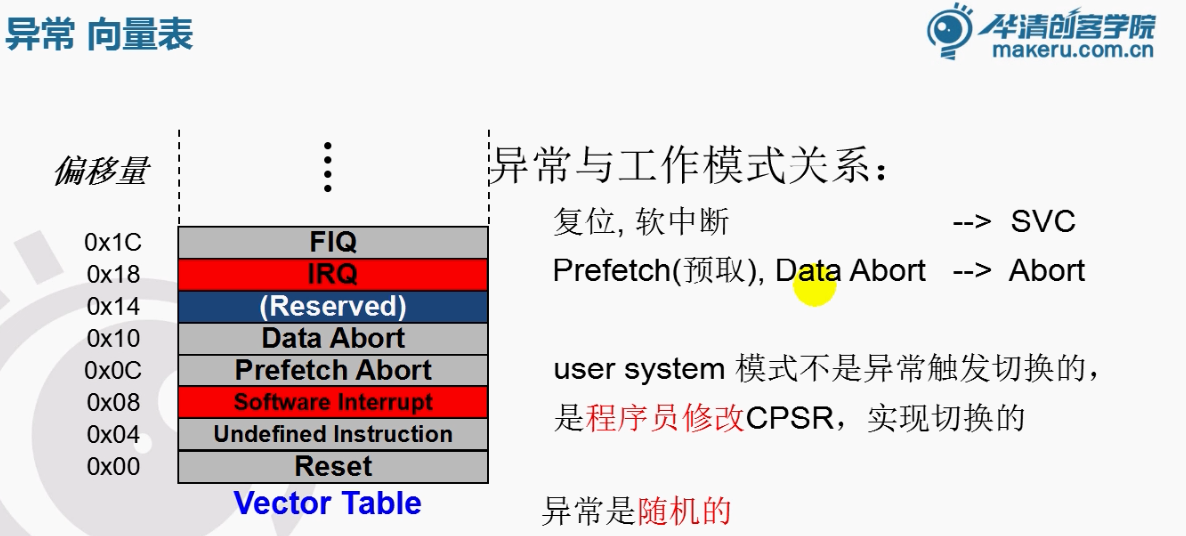
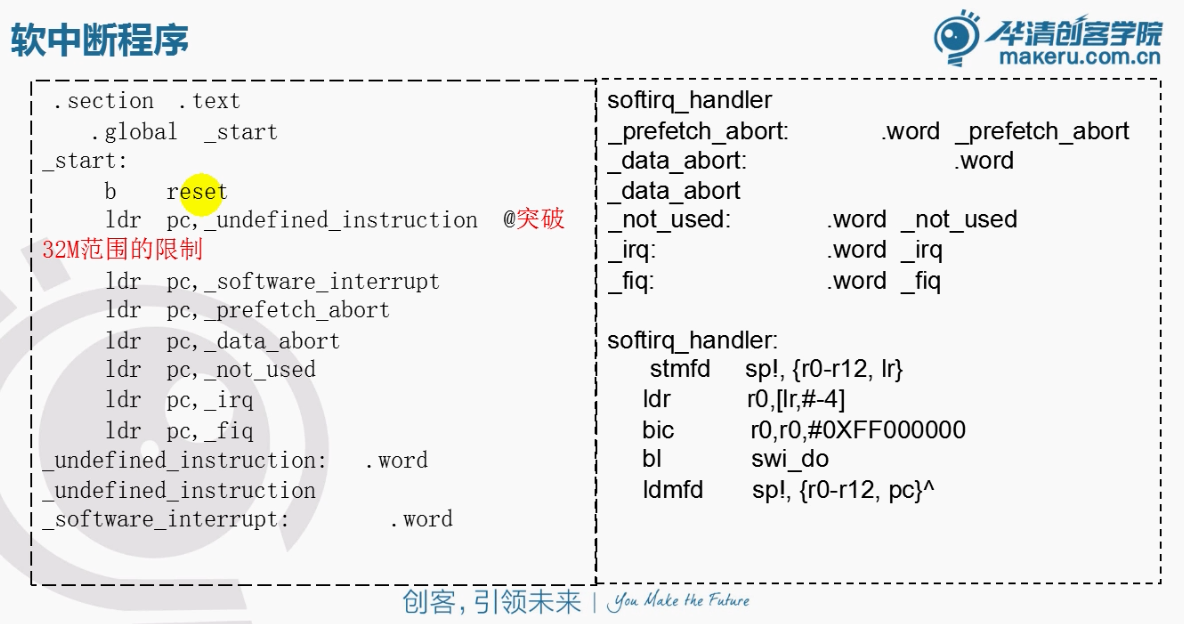
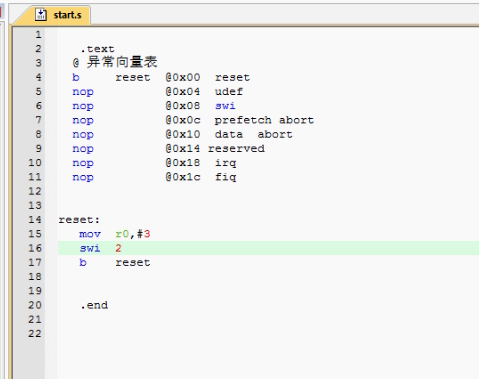
.text
    @mov r0, #1
    @Òì³£ÏòÁ¿±í
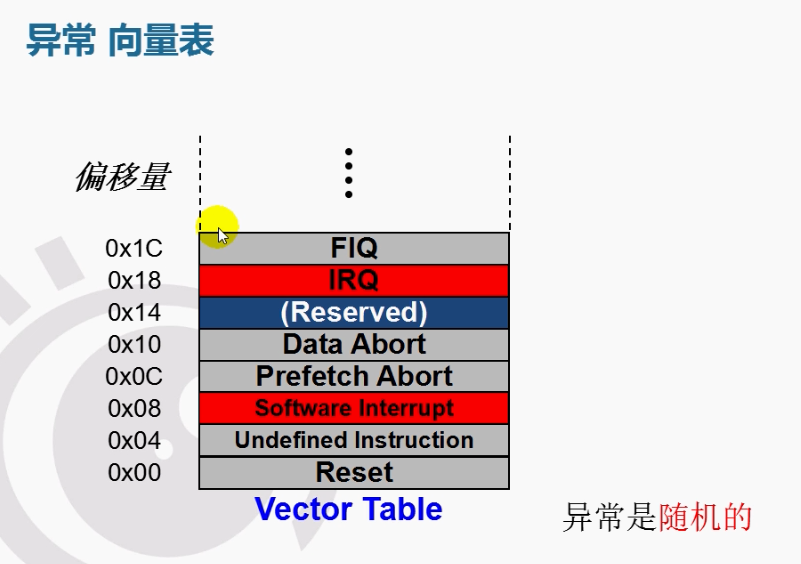
    b    reset    @0x00 reset
    nop         @0x04 udef
    nop            @0x08
    nop         @0x10
    nop            @0x14
    nop            @0x18 irq
    nop            @0x1c fiq


reset:
    mov r0,#3
    swi 2
    b reset

.end
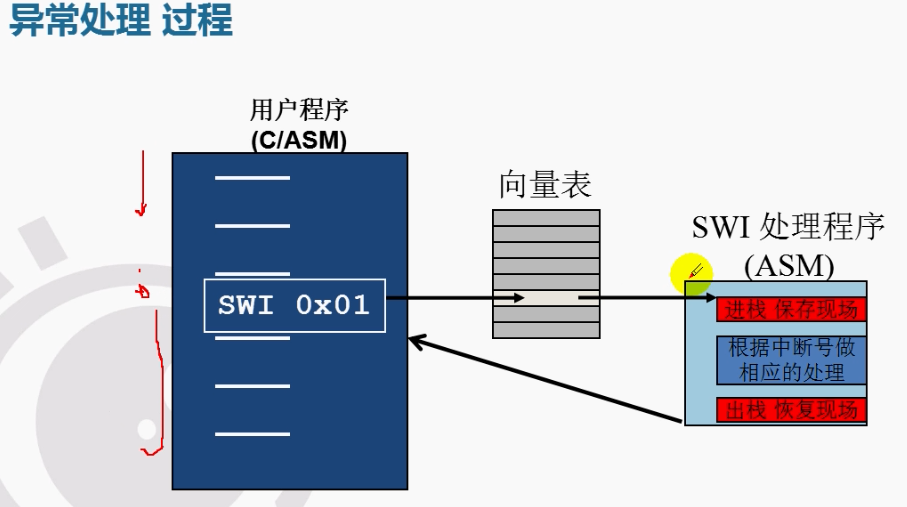
现在我们加上现场保护的机制
.text
    @mov r0, #1
    @Òì³£ÏòÁ¿±í
    b    reset    @0x00 reset
    nop         @0x04 udef
    b    swi_handler        @0x08
    nop            @0x0c
    nop         @0x10
    nop            @0x14
    nop            @0x18 irq
    nop            @0x1c fiq

swi_handler:        @ÈíÖжϴ¦Àíº¯Êý
    stmfd sp!, {r0, lr}        @½øÕ» ±£»¤ÏÖ³¡
    mov        r0, #6
    ldmfd sp!, {r0, pc}        @ ³öÕ»»Ö¸´ÏÖ³¡
    mov pc, lr      @lr¸³Öµµ½pc


reset:
    ldr sp,=stack_base
    mov r0,#3
    swi 2    @Ìøתµ½Òì³£ÏòÁ¿±íÖÐÈíÖжϵÄÈë¿ÚλÖÃ
             @±£´æ·µ»ØµØÖ·µ½lr
    mov r1, r0
    b reset


    .data
buf:
    .space 32
stack_base:


.end
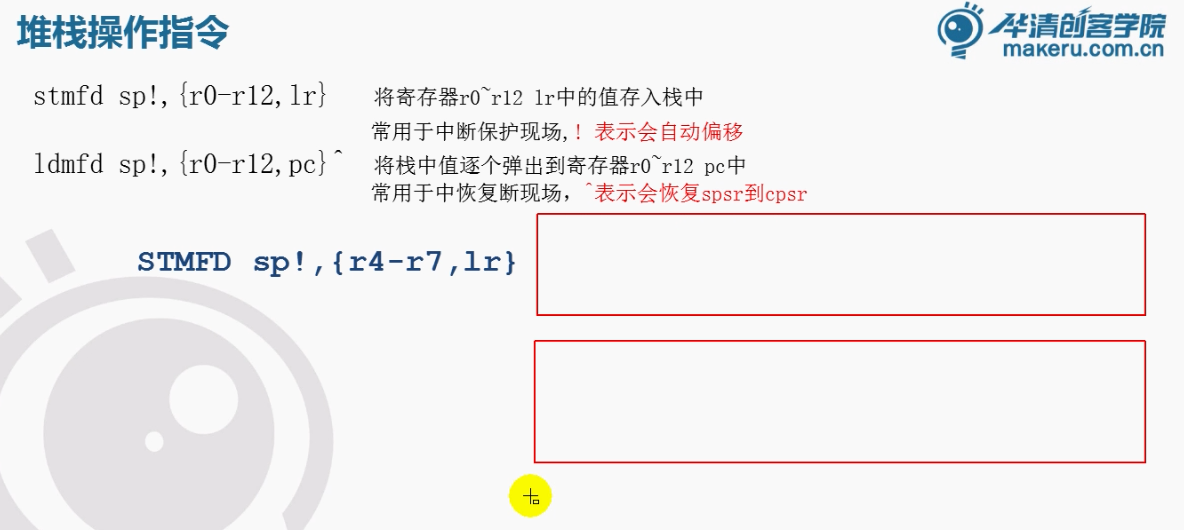
软中断是可以切换至super模式的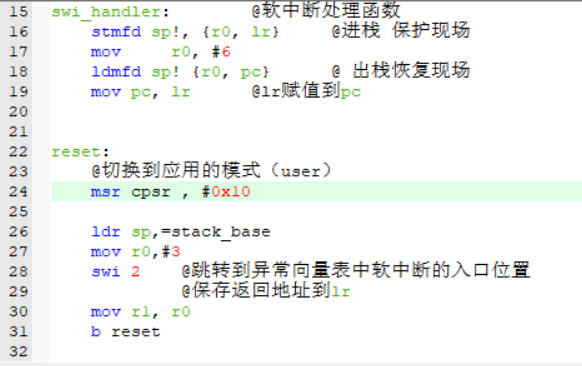
我们根据上面代码先将它切换到用户模式,随后软中断将他切换到super的模式
但是我们发现它中断处理结束后,没有切回到user模式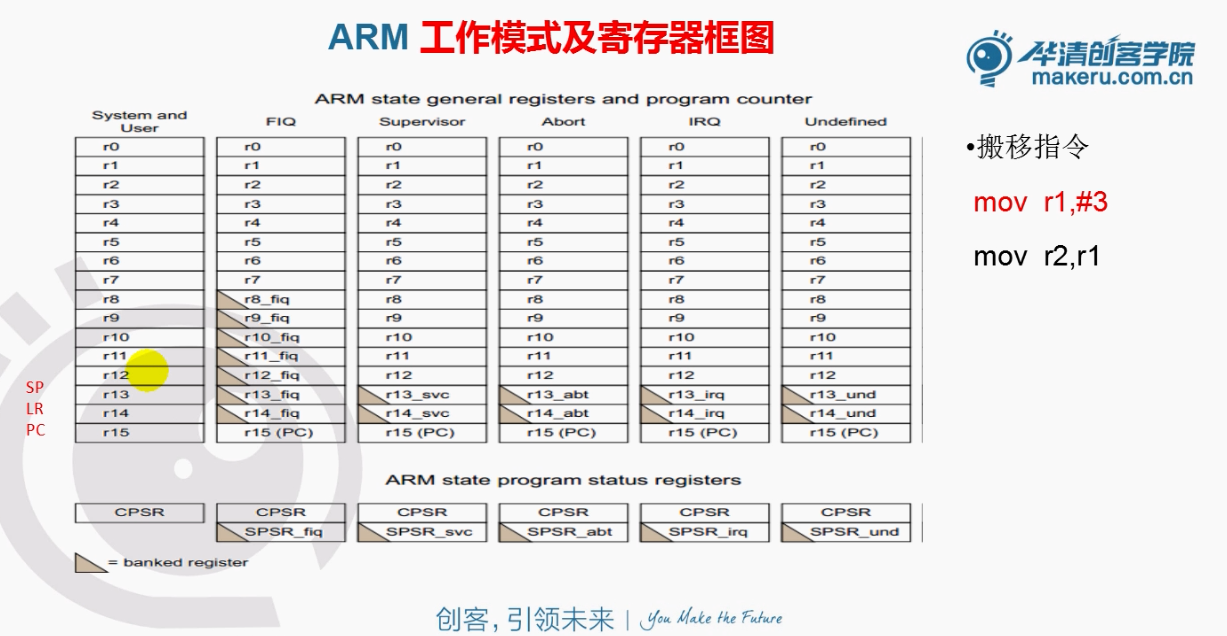
user模式和svc模式R13(SP)不是同一个
.text
    @mov r0, #1
    @Òì³£ÏòÁ¿±í
    b    reset    @0x00 reset
    nop         @0x04 udef
    b    swi_handler        @0x08
    nop            @0x0c
    nop         @0x10
    nop            @0x14
    nop            @0x18 irq
    nop            @0x1c fiq

swi_handler:        @ÈíÖжϴ¦Àíº¯Êý
    stmfd sp!, {r0, lr}        @½øÕ» ±£»¤ÏÖ³¡
    mov        r0, #6
    ldmfd sp!, {r0, pc}^        @ ³öÕ»»Ö¸´ÏÖ³¡
    mov pc, lr      @lr¸³Öµµ½pc


reset:
    ldr sp,=stack_base
    @Çл»µ½Ó¦ÓõÄģʽ£¨user£©
    msr cpsr , #0x10
    mov r0,#3
    swi 2    @Ìøתµ½Òì³£ÏòÁ¿±íÖÐÈíÖжϵÄÈë¿ÚλÖÃ
             @±£´æ·µ»ØµØÖ·µ½lr
    mov r1, r0
    b reset


    .data
buf:
    .space 32
stack_base:


.end
我们将ldr sp,=stack_base放到了上面,但是还是有问题,切换不回去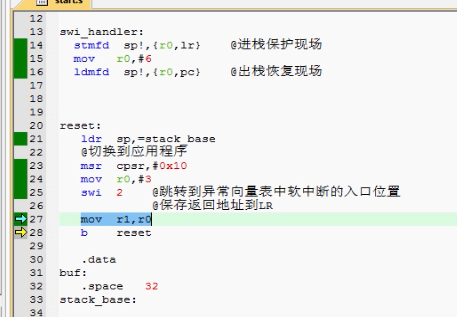
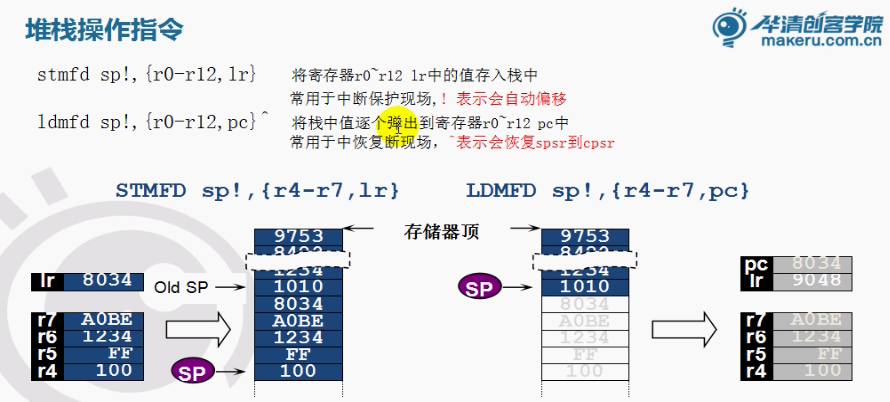
通过一个向上的小箭头,就会恢复到之前的工作模式
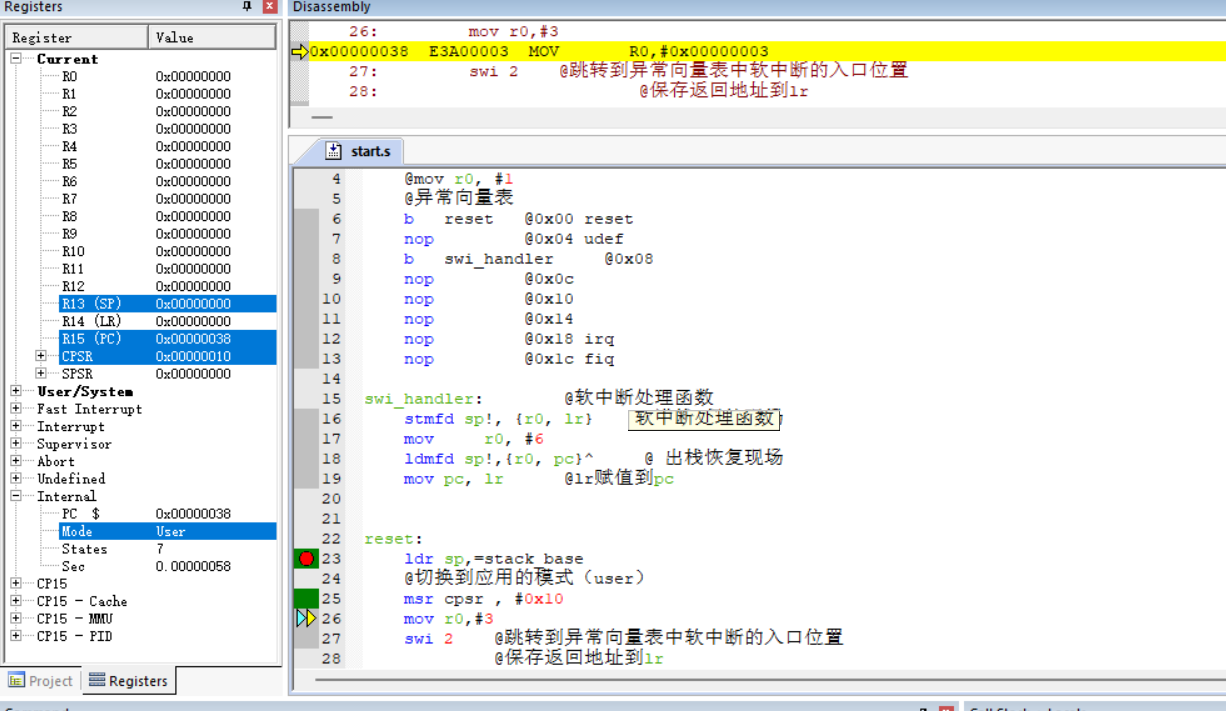
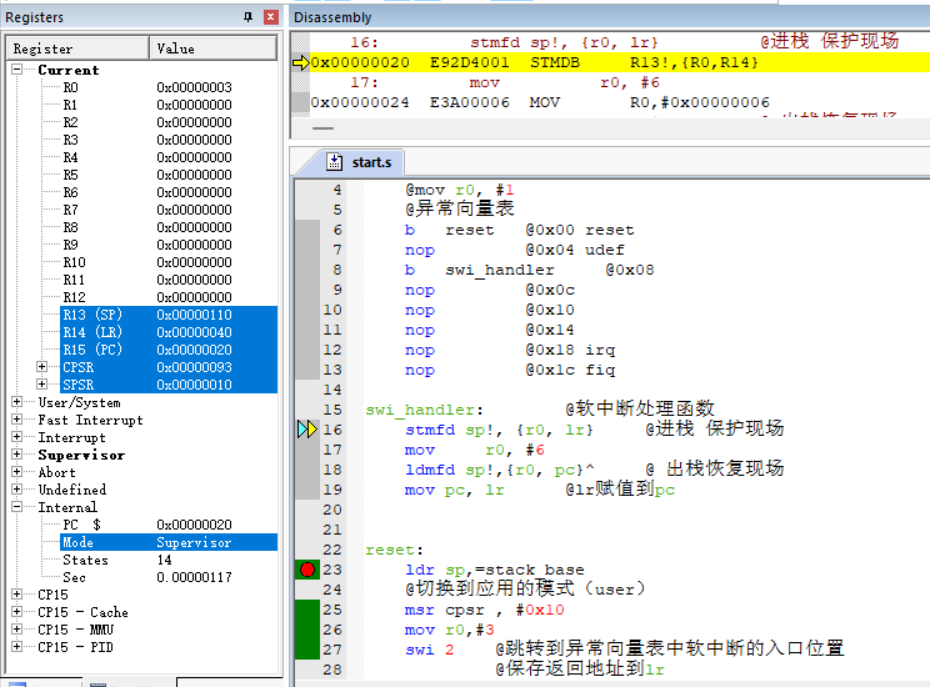
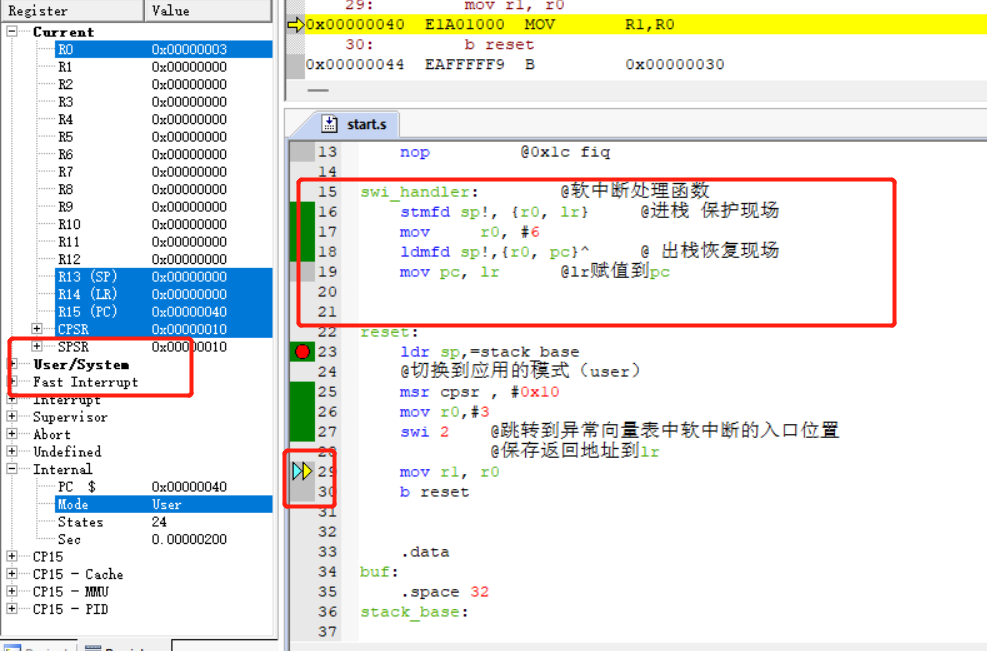
成功
其他软中断
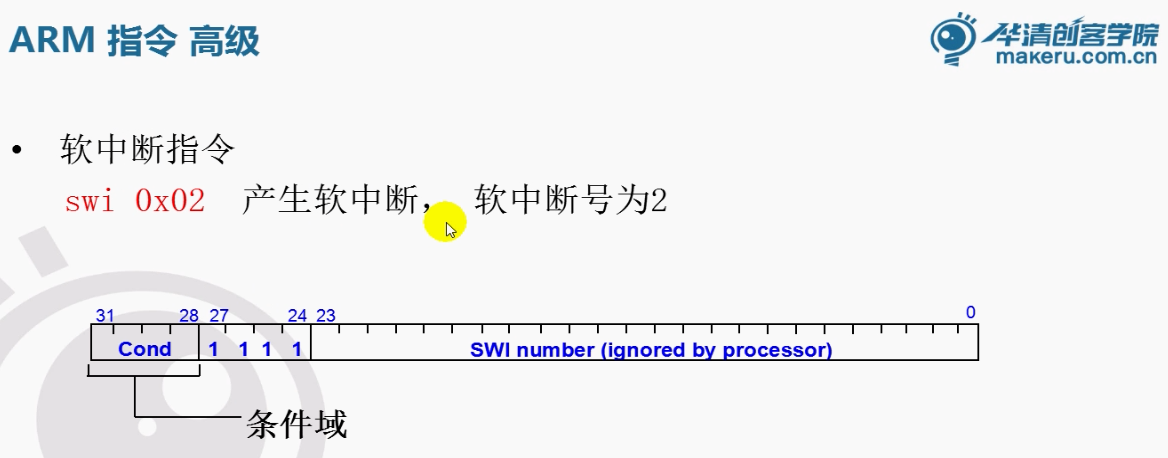
找到软中断地址获得最低的24位
@取软中断地址 软中断下一位-4就是软中断的位置
    sub r0, lr, #4
    @取地址内容  通过地址获取内容
    ldr r0, [r0]
    @只保留最低的24位
    @所以执行一下清除操作
    bic r0, #0xff000000
    @这样就获得了软中断号
完整代码:
.text
    @mov r0, #1
    @异常向量表
    b    reset    @0x00 reset
    nop         @0x04 udef
    b    swi_handler        @0x08
    nop            @0x0c
    nop         @0x10
    nop            @0x14
    nop            @0x18 irq
    nop            @0x1c fiq

swi_handler:        @软中断处理函数
    stmfd sp!, {r0, lr}        @进栈 保护现场


    @取软中断地址 软中断下一位-4就是软中断的位置
    sub r0, lr, #4
    @取地址内容  通过地址获取内容
    ldr r0, [r0]
    @只保留最低的24位
    @所以执行一下清除操作
    bic r0, #0xff000000
    @这样就获得了软中断号

    @mov        r0, #6
    bl        swi_num_handler
    ldmfd sp!,{r0, pc}^        @ 出栈恢复现场
    @ mov pc, lr      @lr赋值到pc

swi_num_handler:
    @swicth(num):
    @case...
    @....

    mov pc, lr


reset:
    ldr sp,=stack_base
    @切换到应用的模式(user)
    msr cpsr , #0x10
    mov r0,#3
    swi 2    @跳转到异常向量表中软中断的入口位置
             @保存返回地址到lr
             @切换刀SVC模式
    mov r1, r0

    swi        4
    mov        r6, #3
    nop
    nop
    swi        7
    mov        r8, #0


    b reset


    .data
buf:
    .space 32
stack_base:
.end
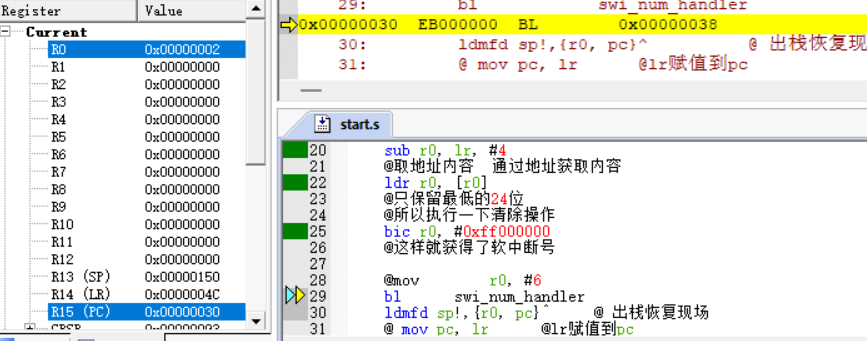
判断: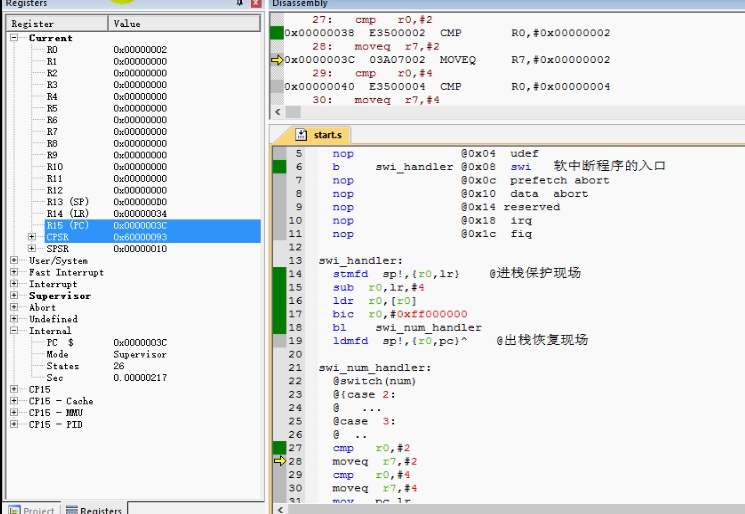
.text
    @mov r0, #1
    @异常向量表
    b    reset    @0x00 reset
    nop         @0x04 udef
    b    swi_handler        @0x08
    nop            @0x0c
    nop         @0x10
    nop            @0x14
    nop            @0x18 irq
    nop            @0x1c fiq

swi_handler:        @软中断处理函数
    stmfd sp!, {r0, lr}        @进栈 保护现场


    @取软中断地址 软中断下一位-4就是软中断的位置
    sub r0, lr, #4
    @取地址内容  通过地址获取内容
    ldr r0, [r0]
    @只保留最低的24位
    @所以执行一下清除操作
    bic r0, #0xff000000
    @这样就获得了软中断号

    bl        swi_num_handler
    ldmfd sp!,{r0, pc}^        @ 出栈恢复现场
    @ mov pc, lr      @lr赋值到pc

swi_num_handler:
    @swicth(num):
    @case...
    @....
    cmp r0, #2
    moveq r7, #2
    cmp r0, #4
    moveq r7, #4
    cmp r0, #8
    moveq r7, #8

    mov pc, lr


reset:
    ldr sp,=stack_base
    @切换到应用的模式(user)
    msr cpsr , #0x10
    mov r0,#3
    swi 2    @跳转到异常向量表中软中断的入口位置
             @保存返回地址到lr
             @切换刀SVC模式
    mov r1, r0

    swi        4
    mov        r6, #3
    nop
    nop
    swi        7
    mov        r8, #0


    b reset


    .data
buf:
    .space 32
stack_base:


.end
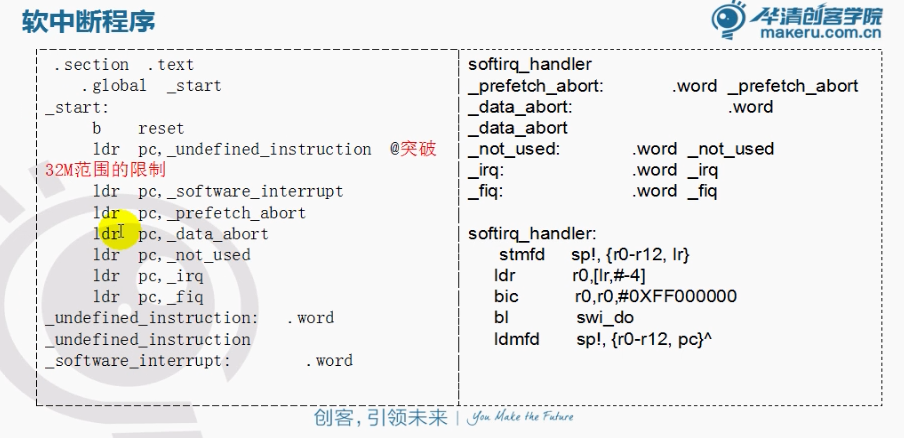
突破32M空间限制(swi_handler如果地址很大)
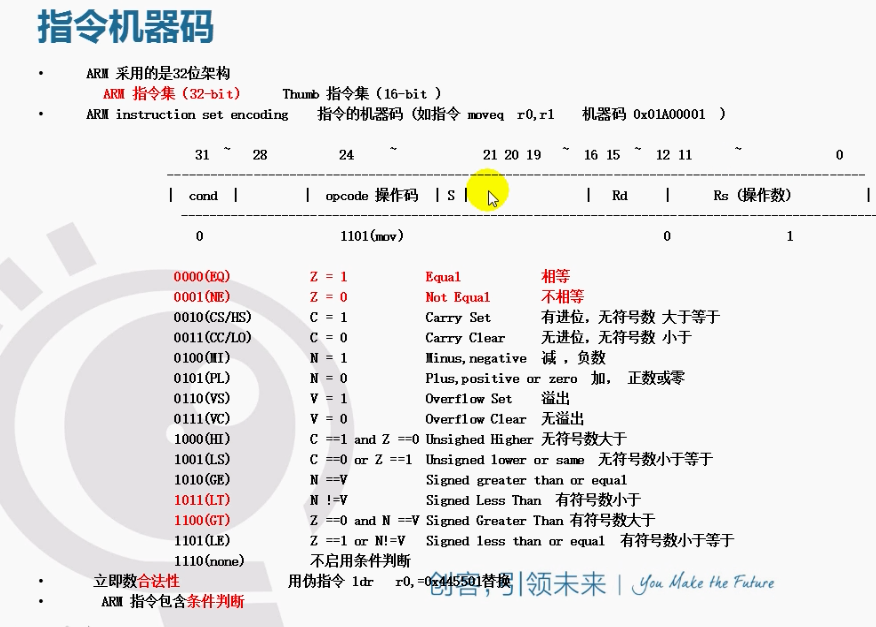
mov 只能放32位的,太大的情况会出问题
有可能b指令放不下
所以可以使用ldr指令:
ldr pc, _swi_handler

_swi_handler:
   .word swi_handler
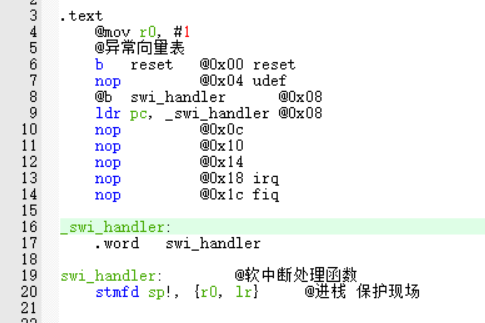
类似下图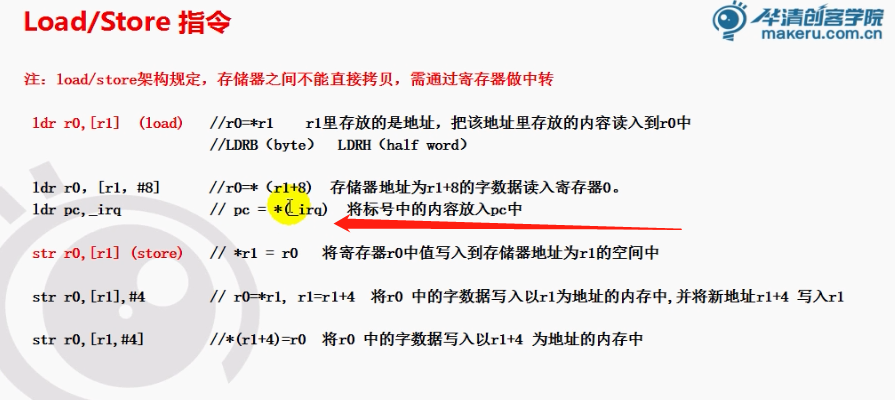
.text
    @mov r0, #1
    @异常向量表
    b    reset    @0x00 reset
    nop         @0x04 udef
    @b    swi_handler         @0x08
    ldr    pc, _swi_handler @0x08
    @把ldr获取的内容赋值给pc
    @为了突破32M空间的限制

    nop            @0x0c
    nop         @0x10
    nop            @0x14
    nop            @0x18 irq
    nop            @0x1c fiq

_swi_handler:  @标号就是个地址  swi_handler数比较特殊,是个函数地址
    .word     swi_handler   @.word占四个字节数
    @ ...
    @ ...
    @ ...

swi_handler:        @软中断处理函数
    stmfd sp!, {r0, lr}        @进栈 保护现场


    @取软中断地址 软中断下一位-4就是软中断的位置
    sub r0, lr, #4
    @取地址内容  通过地址获取内容
    ldr r0, [r0]
    @只保留最低的24位
    @所以执行一下清除操作
    bic r0, #0xff000000
    @这样就获得了软中断号

    bl        swi_num_handler
    ldmfd sp!,{r0, pc}^        @ 出栈恢复现场
    @ mov pc, lr      @lr赋值到pc

swi_num_handler:
    @swicth(num):
    @case...
    @....
    cmp r0, #2
    moveq r7, #2
    cmp r0, #4
    moveq r7, #4
    cmp r0, #8
    moveq r7, #8

    mov pc, lr
如果以前用b指令跳转,函数可能地址很大,就会出错
b指令存储地址的空间是有限的
所以我们只能把这个地址单纯用一个四个字节空间来存放
通过间接的方式去获取
ldr获取的时候是通过相对偏移来获取
所以现在地址多大都无所谓,不会超过32位
通过两种方式,就突破了32M
.text
    @mov r0, #1
    @异常向量表
    b    reset    @0x00 reset
    nop         @0x04 udef
    @b    swi_handler         @0x08
    ldr    pc, _swi_handler @0x08
    @把ldr获取的内容赋值给pc
    @为了突破32M空间的限制

    nop            @0x0c
    nop         @0x10
    nop            @0x14
    nop            @0x18 irq
    nop            @0x1c fiq

_swi_handler:  @标号就是个地址  swi_handler数比较特殊,是个函数地址
    .word     swi_handler   @.word占四个字节数
    @ ...
    @ ...
    @ ...

swi_handler:        @软中断处理函数
    stmfd sp!, {r0, lr}        @进栈 保护现场


    @取软中断地址 软中断下一位-4就是软中断的位置
    sub r0, lr, #4
    @取地址内容  通过地址获取内容
    ldr r0, [r0]
    @只保留最低的24位
    @所以执行一下清除操作
    bic r0, #0xff000000
    @这样就获得了软中断号

    bl        swi_num_handler
    ldmfd sp!,{r0, pc}^        @ 出栈恢复现场
    @ mov pc, lr      @lr赋值到pc

swi_num_handler:
    @swicth(num):
    @case...
    @....
    cmp r0, #2
    moveq r7, #2
    cmp r0, #4
    moveq r7, #4
    cmp r0, #8
    moveq r7, #8

    mov pc, lr


reset:
    ldr sp,=stack_base
    @切换到应用的模式(user)
    msr cpsr , #0x10
    mov r0,#3
    swi 2    @跳转到异常向量表中软中断的入口位置
             @保存返回地址到lr
             @切换刀SVC模式
    mov r1, r0

    swi        4
    mov        r6, #3
    nop
    nop
    swi        7
    mov        r8, #0


    b reset


    .data
buf:
    .space 32
stack_base:
.end
尝试完善中断
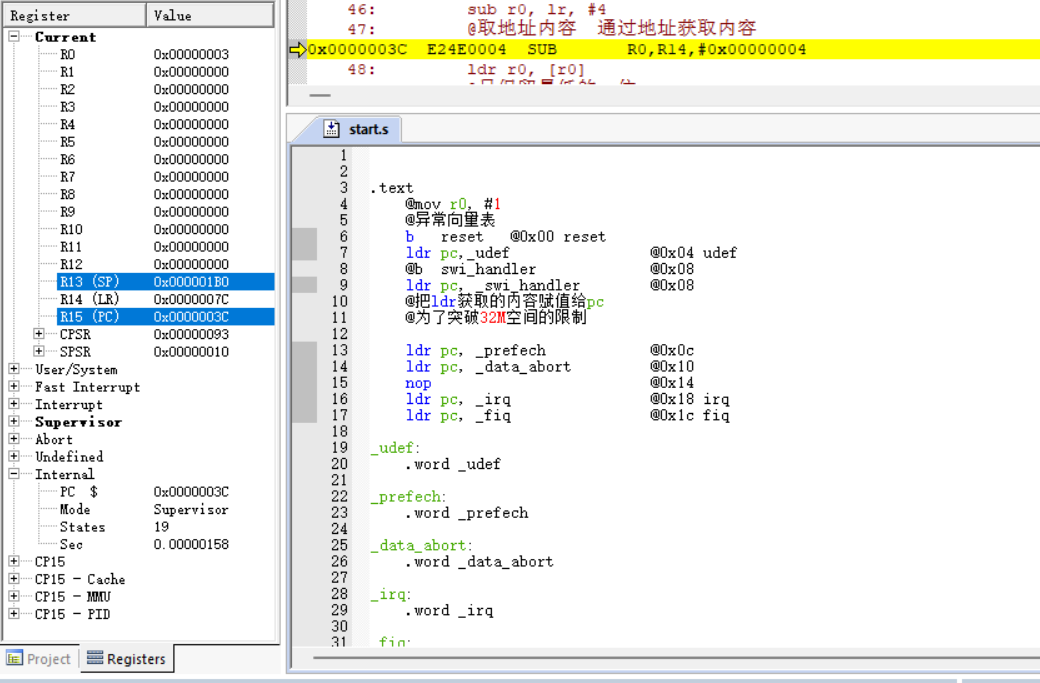
.text
    @mov r0, #1
    @异常向量表
    b    reset    @0x00 reset
    ldr pc,_udef                 @0x04 udef
    @b    swi_handler                 @0x08
    ldr    pc, _swi_handler         @0x08
    @把ldr获取的内容赋值给pc
    @为了突破32M空间的限制

    ldr pc, _prefech            @0x0c
    ldr pc, _data_abort         @0x10
    nop                            @0x14
    ldr pc, _irq                @0x18 irq
    ldr pc, _fiq                @0x1c fiq

_udef:
    .word _udef

_prefech:
    .word _prefech

_data_abort:
    .word _data_abort

_irq:
    .word _irq

_fiq:
    .word _fiq


_swi_handler:  @标号就是个地址  swi_handler数比较特殊,是个函数地址
    .word     swi_handler   @.word占四个字节数
    @ ...
    @ ...
    @ ...

swi_handler:        @软中断处理函数
    stmfd sp!, {r0, lr}        @进栈 保护现场


    @取软中断地址 软中断下一位-4就是软中断的位置
    sub r0, lr, #4
    @取地址内容  通过地址获取内容
    ldr r0, [r0]
    @只保留最低的24位
    @所以执行一下清除操作
    bic r0, #0xff000000
    @这样就获得了软中断号

    bl        swi_num_handler
    ldmfd sp!,{r0, pc}^        @ 出栈恢复现场
    @ mov pc, lr      @lr赋值到pc

swi_num_handler:
    @swicth(num):
    @case...
    @....
    cmp r0, #2
    moveq r7, #2
    cmp r0, #4
    moveq r7, #4
    cmp r0, #8
    moveq r7, #8

    mov pc, lr


reset:
    ldr sp,=stack_base
    @切换到应用的模式(user)
    msr cpsr , #0x10
    mov r0,#3
    swi 2    @跳转到异常向量表中软中断的入口位置
             @保存返回地址到lr
             @切换刀SVC模式
    mov r1, r0

    swi        4
    mov        r6, #3
    nop
    nop
    swi        7
    mov        r8, #0


    b reset


    .data
buf:
    .space 32
stack_base:
.end
本次难点: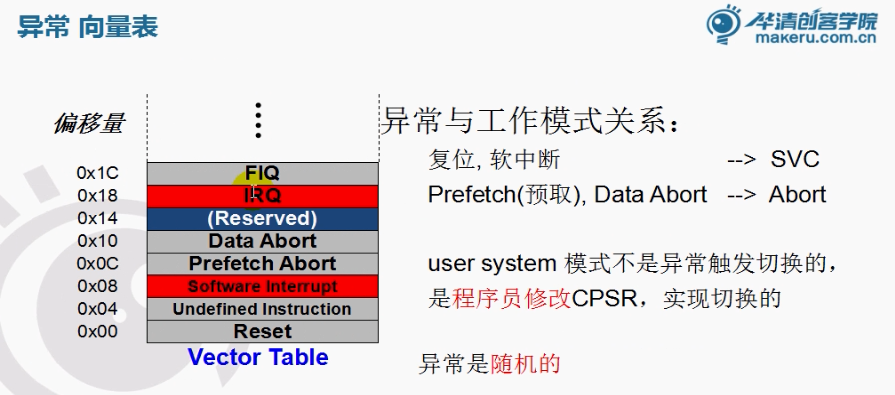
现在看复杂的程序和uboot就没问题了